






If you have spent any time playing games through a web browser lately, you probably noticed it felt a bit like using a placeholder. You click a link, a static library of covers pops up, and you launch a game. It works, but it feels distant. Recently, Microsoft started rolling out a new version of the Xbox Cloud Gaming UI to testers that changes the vibe completely. Instead of a website that happens to stream video, you are looking at a living, breathing dashboard. It is an exact match for the interface you would see if you sat down in front of a physical Xbox Series X, complete with a dynamic home screen and a sidebar that actually responds to your controller.
This new layout is built around the idea that your “Xbox” is actually just an account, not a piece of plastic under your TV. When you pull up the page now, you see your friends list immediately. You can see who is playing what and join a party chat right from the browser. It even includes a notification hub for all those game invites and messages you used to miss because you were playing on a laptop. By making the web experience mirror the console hardware so closely, Microsoft is effectively erasing the line between “real” gaming and cloud streaming. Any device with a screen and an internet connection now has the soul of a high end console.
The most practical addition here is the Xbox Guide. On a console, that pop up menu is how you do everything from checking achievements to swapping between games. Bringing that exact menu to a browser window is a massive technical leap for user comfort. You no longer have to quit out of a session or fumble with browser tabs to see a message from a friend. Everything stays inside the game environment. This creates a sense of “place” that has been missing from cloud gaming for years. You aren’t just visiting a website anymore; you are logging into your console, even if that console is technically sitting in a server farm hundreds of miles away.
Table of Contents
Why your handheld is already being built
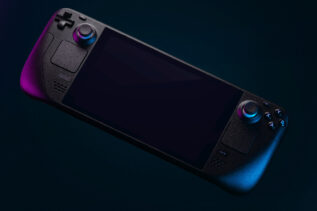
It is hard to look at these changes and not see a clear path toward a dedicated Xbox handheld. Companies like Valve and Asus have already proven that people want to play big games in their hands, but the software on those devices is often the weak link. Windows is great on a desk, but it is clunky on a small touchscreen with joysticks. By testing this new Xbox Cloud Gaming UI in the browser first, Microsoft is basically perfecting the operating system for a future portable device. They are letting millions of people act as test subjects to see how a controller friendly menu feels on small displays.
A handheld device lives or dies based on how quickly you can get into a game and how easily you can talk to your friends. This interface solves both of those problems before the hardware even exists. The buttons are bigger, the navigation is snappier, and the whole thing is designed to be operated without ever touching a mouse. This suggests that Microsoft’s eventual entry into the handheld market won’t just be a “portable PC” like its competitors. It will likely be a dedicated device that boots straight into this polished, cloud ready interface. They are building the foundation of the house before they even pick out the bricks.
For the person holding the device, this means a much smoother experience down the road. We have seen what happens when hardware launches with “beta” software, and it is usually a mess. Microsoft is taking the opposite approach by letting the cloud do the heavy lifting while they iron out the kinks in the user experience. By the time a physical Xbox handheld hits the shelves, the software will already be a veteran of the web. You will turn it on and it will feel like the Xbox you have been using for years, just smaller and more portable.
The honest reality of gaming over a wire
Even with a beautiful new interface, we have to address the fact that cloud gaming still relies on your home network to do the impossible. A pretty menu cannot fix a bad router. When you play through the Xbox Cloud Gaming UI, every move you make has to travel to a server and back in milliseconds. If that path is blocked by a weak Wi-Fi signal or a crowded network, you are going to see “stuttering.” This is when the image freezes for a split second or looks like a blurry mess of pixels. It is the most common way your experience gets ruined, and it has nothing to do with the power of your laptop or phone.
If you find yourself fighting with lag, the first thing to check is your Wi-Fi band. Most routers output two signals: a 2.4GHz and a 5GHz. The 2.4GHz signal is the old standard, and it is usually saturated with interference from things like your neighbor’s router or even your microwave. Switching to 5GHz or 6GHz is like moving from a dirt road to a highway. If you are on a laptop, another quick fix is to plug in a basic ethernet cable. It sounds old school, but it removes almost all the “jitter” that causes those annoying skips in gameplay. You should also close any other tabs that might be sucking up your bandwidth in the background.
There is also the issue of server capacity. Because you are essentially “renting” a piece of hardware in a data center, there can be a line to get in during peak hours. If a massive game just dropped on Game Pass, the Xbox Cloud Gaming UI might show you a countdown timer. While this is frustrating, it is a hardware limitation on Microsoft’s end. To get around this, try to avoid the “after work” rush between 6 PM and 9 PM. If you can play a little earlier or later, you will likely bypass the queue entirely and get a much more stable stream since the servers aren’t being pushed to their absolute limits.
This could change the way we approach game ownership
This UI overhaul is the first step toward a future where your games aren’t tied to a specific box. Microsoft is moving toward a “Play Anywhere” philosophy that actually works. Soon, you won’t just be limited to the games available on the Game Pass subscription. They are working on letting you stream games that you have bought and paid for individually. This is a massive shift in how we think about digital ownership. If you buy a huge open world game, you can play the main missions on your big TV at home and then pull out your phone at a coffee shop to finish some side tasks using the exact same interface.
This level of freedom is great, but it does mean we are putting a lot of trust in a single company’s ecosystem. If you are someone who likes to buy discs and play offline, this cloud focused future might feel a little bit intimidating. It is important to remember that this new interface is an addition, not a replacement. Microsoft still knows that many people want a powerful console under their TV for the best possible graphics and zero lag. The cloud UI is just a way to make sure that when you aren’t in front of that TV, your games are still within reach.
At the end of the day, this update is about making the technology invisible. The goal of the new Xbox Cloud Gaming UI is to make you forget you are using a web browser at all. By focusing on the social features and the familiar “Guide” menu, Microsoft is turning every screen you own into a portal to your gaming life. Whether you are a hardcore gamer or someone who just plays a few minutes a day, having a consistent, high quality experience across every device is a win. It simplifies the process, removes the friction, and lets you get back to what actually matters which is playing the game.


