







What personal data does the Amazon Echo Dot Max send to the Cloud?

In early 2026, the smart home landscape has been transformed by the release of the Amazon Echo Dot Max. This device is the first in its category to fully integrate the new Alexa+ generative artificial intelligence system. Unlike previous versions of the smart speaker, this model is designed to act as an agentic assistant that can perform complex tasks and have more fluid, natural conversations. While these advancements provide a high level of convenience for the user, they also represent a significant shift in how personal data is collected and processed.

Because the AI requires massive amounts of computing power, much of the data that was once handled locally on the device must now be sent to the Amazon cloud. Understanding the specific categories of information that leave your home is the first step in maintaining your digital privacy in this new era of technology.

The latest privacy updates from Amazon indicate that the cloud is no longer optional for those who want to use the full range of AI features. In previous years, users could opt out of many cloud-based processing features while still keeping basic voice functionality. However, with the 2026 Echo Dot Max, many of the advanced reasoning and memory functions depend entirely on remote servers.

This means that even the way the device listens for your commands has changed. It is no longer just looking for a simple keyword but is instead analyzing the tone and context of your voice to provide a more helpful response. This change in technology has created a more complex data map that every homeowner should be aware of before they install the hardware in their private living spaces.

Does the Amazon Echo Dot Max record all my conversations?

The Echo Dot Max is designed to listen only for its specific wake word. Under normal operating conditions, the device maintains a local buffer of audio that is only a few seconds long. This audio is constantly overwritten and never leaves the device unless the wake word is detected. Once you say the wake word, the device begins a recording that is sent to the Amazon cloud for processing. This is a technical requirement because the generative AI models in Alexa+ are too large to run entirely on the small processor inside the speaker. It is important to know that while the device is always listening for its name, it is not recording or storing your private conversations until it believes you are speaking to it directly.

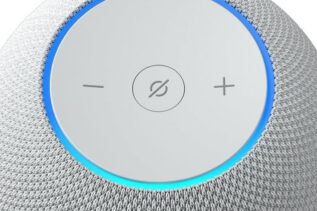
There are instances where a device might record a conversation by mistake if it hears a sound that is similar to the wake word. These are known as false triggers. When this happens, a small blue light appears on the device to indicate that it is active. In the 2026 version of the software, Amazon has improved the acoustic models to reduce these errors, but they still occur occasionally. If you see the light turn on when you did not mean to summon the assistant, you can be sure that a short segment of audio was sent to the cloud. You can review these accidental recordings in your privacy dashboard and delete them at any time to ensure they are not used for any other purposes.


What personal data does the Echo Dot Max collect?

The Echo Dot Max collects three main types of data to function effectively within your home. The first category is technical data, which includes your IP address, your Wi-Fi signal strength, and the health of your device hardware. This information is used to keep the system running smoothly and to provide security updates. The second category is interaction data, which includes the text transcripts of your requests and the audio files of your voice. This allows the AI to learn your preferences and provide more accurate answers over time. The third category is environmental data, gathered by the built-in sensors that detect room temperature, light levels, and the presence of people in the room through ultrasonic motion detection.

In 2026, the data collection has expanded to include more context about your daily life. Because Alexa+ is designed to be a proactive assistant, it keeps track of your routines and the other smart devices you have connected, such as your lights or your security cameras. This allows the system to notice patterns, such as the time you usually arrive home or which rooms you use the most. While this level of data collection enables features like automatic energy saving and enhanced home security, it also creates a very detailed digital profile of your household. You have the option to limit some of this collection in the settings, but doing so will often disable the advanced AI features that make the Dot Max unique.


Who does Amazon share my Alexa+ data with?

Amazon does not sell your personal voice recordings to other companies for their own marketing purposes. However, your data is shared with specific partners to provide the services you request. For example, if you use a third-party “skill” to order food or book a ride, Amazon must share your name and your delivery address with that specific service provider. In 2026, the interoperability of the Matter protocol means that your data may also flow between different smart home platforms. If you have a Google Nest thermostat connected to your Amazon hub, some technical data about your home temperature must be shared between the two companies to ensure the devices work together correctly.

Law enforcement and government agencies may also gain access to your data under specific legal circumstances. Amazon states that it only provides user information when it receives a legally valid and binding order, such as a search warrant or a subpoena. The company typically notifies users when their data is requested unless it is legally prohibited from doing so. Additionally, Amazon uses a small, anonymized sample of voice recordings to train its AI models. These snippets are reviewed by human employees or automated systems to improve the accuracy of the speech recognition software. You can choose to opt out of this specific type of data sharing in the privacy settings of the Alexa application.

How do I delete my voice history on the Echo Dot Max?

Deleting your voice history is a straightforward process that can be done through the Alexa app or on the Amazon website. You can find the privacy section in the settings menu, which allows you to view a complete log of every interaction the device has recorded. You have the option to delete individual recordings, all recordings from a specific date range, or your entire history since you started using the device. In the 2026 software update, Amazon has also included a voice command that allows you to manage this directly on the speaker. By saying, “Alexa, delete everything I said today,” you can immediately clear your recent history without opening an app.

For users who want a more hands-off approach, there is an auto-delete setting that will periodically clear your history for you. You can choose to have your recordings automatically deleted after three months or eighteen months. It is worth noting that deleting your history may slightly decrease the accuracy of the AI because it will lose the data it uses to recognize your specific voice patterns and preferences. However, for many homeowners, the increase in privacy is worth the small trade-off in performance. Regularly clearing your data is a good habit to prevent a large archive of your personal interactions from sitting on a server indefinitely.


Can I use the Echo Dot Max without an internet connection?

The Echo Dot Max requires an active internet connection for the vast majority of its features. Because the Alexa+ AI is a cloud-based service, it cannot process complex commands or provide information from the web if the Wi-Fi is down. If your internet connection is lost, the device will display a red light ring and will be unable to respond to your requests. Basic local tasks, such as triggering a pre-set alarm or controlling certain smart home devices that use the Matter protocol locally, may still work depending on your specific network setup. However, the conversational intelligence that defines the Dot Max will be completely unavailable until the connection is restored.

The reliance on the cloud is a core part of the design for modern smart speakers in 2026. Processing the high-level reasoning required for generative AI on the device itself would require much more expensive hardware and would generate a significant amount of heat. By sending the data to a data center, Amazon can provide a much faster and more capable assistant. For users who live in areas with unreliable internet, this means the device may not be a dependable tool for critical tasks. If you are concerned about your data being sent to the cloud, you may want to look into “local-first” smart home hubs that do not require an external server, though these systems usually lack the advanced conversational abilities of the Echo Dot Max.

How to turn off the microphone on the new Echo Dot Max?

If you want to ensure that your device is not listening at all, you can use the physical microphone disconnect button located on the top of the speaker. When you press this button, the electrical circuit to the microphones is physically cut, which means the device cannot hear or record any audio. A dedicated red light will illuminate to confirm that the microphones are disabled. This is a hardware-level security feature that cannot be bypassed by software or by a remote hacker. It is the most effective way to guarantee total privacy in a room when you are having a sensitive conversation or when you simply do not want the AI to be active.


Using the physical mute button will disable all voice-activated features, including the wake word. You will still be able to use the device to play music or respond to routines that you have scheduled through the app, but you will not be able to give it any new voice commands until you press the button again to turn the microphones back on. For many users, muting the device at night or during important meetings provides a necessary sense of control over their environment. It is a simple and reliable solution for managing the privacy of your smart home without having to navigate through complex software menus.
